
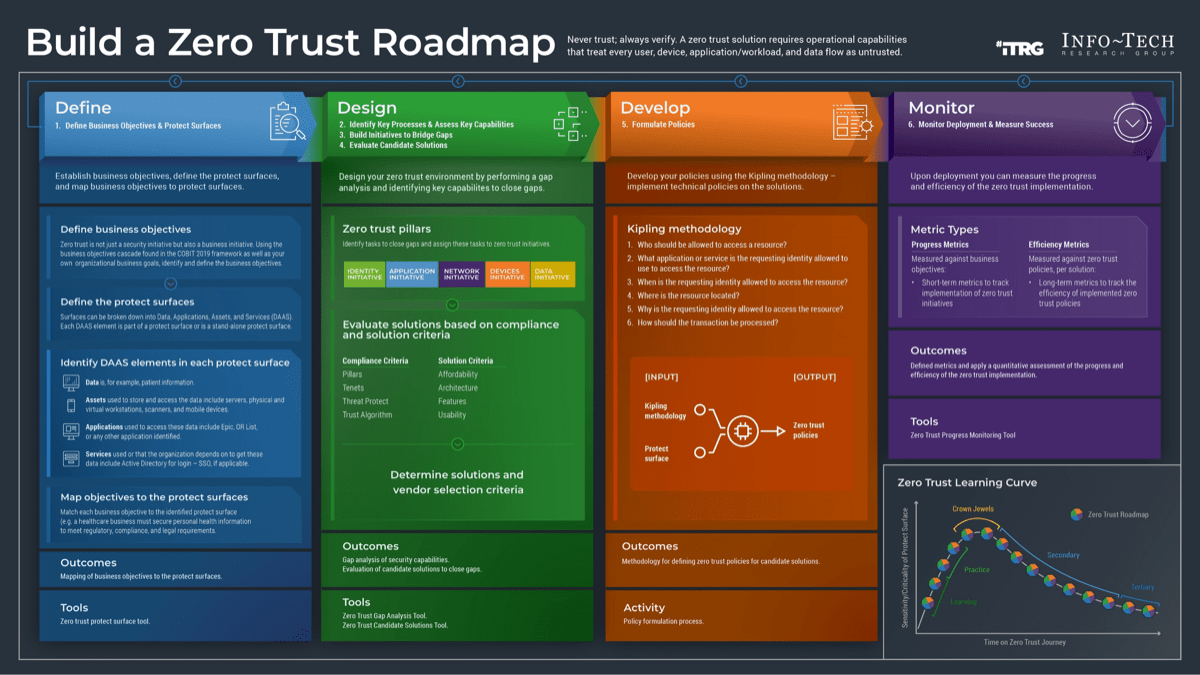

What matters most in a zero trust security audit
A zero trust architecture audit is not a box-ticking exercise; it is a stress test of your identity and access controls. The goal is to verify that every request—whether from an employee in the office or a remote user—is authenticated, authorized, and encrypted before access is granted.
Start by verifying identity verification. Zero trust requires strong, verifiable identities for both users and their devices. A valid username and password from a compromised, unmanaged endpoint is insufficient. Ensure multi-factor authentication (MFA) is enforced everywhere, with no exceptions for internal networks or legacy applications.
Next, map your micro-segmentation. Can a compromised laptop in the marketing department access the financial database? If the answer is yes, your network perimeter is still implicit. Effective segmentation limits lateral movement, containing breaches before they spread.
Finally, review your continuous monitoring. Zero trust is not a one-time setup. It requires real-time visibility into user behavior and device health. If you cannot see who is accessing what, when, and from where, you are flying blind. Prioritize these core checks to build a resilient foundation for your 2026 security posture.
Details to compare
Evaluating a Zero Trust Architecture requires moving beyond binary yes/no answers. Most frameworks, such as the NIST SP 800-207 guidelines or the SEI’s protect surface methodology, break down into specific, measurable components. When auditing your enterprise, you must weigh the tradeoffs between strict identity verification and user experience, as well as the complexity of micro-segmentation versus broader network zones.
The following comparison outlines the core factors you should evaluate during a security audit. These distinctions help determine where your current infrastructure aligns with zero trust principles and where gaps remain open to lateral movement.
| Audit Factor | Identity & Access | Network Segmentation | Data Protection |
|---|---|---|---|
| Verification Scope | Continuous authentication for every user and device, regardless of location | Implicit trust in internal network zones | Static classification based on sensitivity |
| Access Control | Least privilege enforced via dynamic policies | Perimeter-based firewalls and VLANs | Encryption at rest and in transit |
| Monitoring | Behavioral analytics and anomaly detection | Traffic flow mapping and intrusion detection | Data loss prevention (DLP) and access logging |
| Failure Mode | Default deny; access revoked on policy violation | Single point of failure at the perimeter | Unencrypted data exposed if storage is breached |
How to decide
Zero Trust Architecture Security Audit checklist works best as a sequence, not a pile of settings. Do the minimum first: confirm compatibility, connect the primary device, update only when needed, and test the result before adding optional features. That order keeps the task understandable and makes failures easier to isolate. After each step, pause long enough for the device or app to finish syncing. Many setup problems are timing problems disguised as configuration problems. If the same step fails twice, record the exact error, restart the smallest affected piece, and retry before moving deeper.
What to avoid
A zero trust audit is only as reliable as the evidence you collect. Many teams treat these assessments as a box-checking exercise, relying on self-reported compliance rather than verifying actual control effectiveness. This approach creates a false sense of security that adversaries exploit.
The most common mistake is assuming that identity verification alone satisfies zero trust. As noted by SystemsArchitect.io, a valid username and password from a compromised, unmanaged device is insufficient. You must verify the device’s health, posture, and context alongside the user’s credentials. If you skip device attestation, you are not practicing zero trust; you are just managing logins.
Another trap is treating the audit as a one-time event. Zero trust is a continuous state, not a static configuration. Teams often complete the assessment, file the PDF, and forget to update policies as the network evolves. This lag allows shadow IT and unauthorized access points to grow unnoticed.
Finally, avoid vague metrics. Do not settle for “mostly compliant” or “in progress.” Require concrete data: specific MFA enforcement rates, exact segmentation rules applied, and verified least-privilege access logs. Ambiguity is where breaches hide.
Common questions
How long does a zero trust audit take?
A comprehensive zero trust architecture assessment typically requires 4–6 hours to complete. This timeframe accounts for identifying all users and non-person entities, mapping transaction flows, and verifying identity controls across your environment. Teams often use digital templates to streamline data collection, but the actual analysis of protect surfaces and least privilege policies demands focused attention.
Is zero trust just about multi-factor authentication?
No. While strong, verifiable identities are foundational, zero trust requires more than just usernames and passwords. You must also enforce least privilege access, segment networks, and encrypt data in transit and at rest. A valid credential from a compromised, unmanaged device should not grant access. The architecture relies on continuous verification of both user and device health.
Can small businesses implement zero trust?
Yes, but the scope differs from enterprise deployments. For small to mid-sized businesses, the focus should be on defining your protect surface first, then mapping transaction flows. You don’t need complex infrastructure to start; you need clear policies. Begin by identifying assets and creating a zero-trust policy that limits access to only what is necessary for specific tasks.
What is the first step in a zero trust checklist?
Start by identifying all users and non-person entities on your network. You cannot secure what you cannot see. Once you have a complete inventory of assets and identities, you can map transaction flows and architect the network accordingly. This foundational step ensures that your zero trust policy is based on reality, not assumptions.
No comments yet. Be the first to share your thoughts!