

Why home networks need better defense
The average home network has become a high-value target. In 2026, the perimeter is gone. Your router is no longer a gatekeeper; it is a transit hub for dozens of devices, many of which have never been patched. Cybersecurity is no longer just about installing antivirus on your laptop. It is about securing the entire ecosystem.
Attackers exploit the weakest link. A smart thermostat with outdated firmware can be the entry point for ransomware that locks your primary computer. CISA emphasizes that individuals must implement preventative measures across all connected devices, not just their workstations. The goal is holistic network security.
This shift requires a change in mindset. You are not just protecting files; you are protecting your identity, your finances, and your privacy. The tools you choose must reflect this broader scope. We will examine the specific solutions that provide this layer of protection.
Routers with built-in threat blocking
A modern home network relies on its router as the primary line of defense. Unlike older models that simply pass traffic through, today’s consumer-grade routers include built-in firewalls and intrusion detection systems. These features actively monitor incoming and outgoing data, blocking known malicious patterns before they reach your devices. This layer of protection is essential for comprehensive Cybersecurity, especially for users who may not manage individual device security settings.
When selecting a router, prioritize models that offer automatic firmware updates. Security vulnerabilities are discovered regularly, and a router that updates itself ensures you are protected against the latest threats without manual intervention. Look for routers from established manufacturers that have a track record of providing long-term software support.
The following routers are recommended for their robust security suites and ease of use. They include features like parental controls, ad blocking, and real-time threat intelligence feeds.


As an Amazon Associate, we may earn from qualifying purchases.
Compare endpoint protection suites
Choosing the right antivirus software for your home network involves balancing detection capabilities with system performance. In 2026, the threat landscape has shifted heavily toward ransomware and polymorphic malware that evades traditional signature-based scanning. Effective endpoint protection must combine real-time heuristic analysis with cloud-based intelligence to identify threats before they encrypt your files or steal your data.
The following comparison highlights leading suites based on independent lab results, feature sets, and resource usage. These tools serve as the first line of defense for the devices connected to your home network, ensuring that a compromised laptop or smartphone does not become a gateway for broader network attacks.
| Product | Ransomware Detection | System Impact | Annual Cost |
|---|---|---|---|
| Bitdefender Total Security | 99.9% (AV-TEST) | Low | $40-$50 |
| Norton 360 Deluxe | 99.8% (AV-TEST) | Medium | $40-$50 |
| Kaspersky Plus | 99.7% (AV-TEST) | Low | $30-$40 |
| McAfee Total Protection | 99.5% (AV-TEST) | High | $40-$50 |
| Trend Micro Antivirus+ | 99.6% (AV-TEST) | Medium | $40-$50 |
When evaluating these options, consider the number of devices you need to protect. Most home users benefit from multi-device licenses that cover smartphones, tablets, and PCs simultaneously. While Bitdefender and Kaspersky often report lower system impact, Norton and McAfee provide more extensive additional features like parental controls and VPNs, which may justify the higher resource usage for some households.
Hardware firewalls for serious users
For users who want a dedicated layer of defense between their ISP and local network, a hardware firewall is the most effective choice. Unlike software-based solutions that run on your computer or router firmware, these appliances inspect traffic at the network edge before it reaches your devices. This provides a consistent Cybersecurity baseline for every connected device, from smart home hubs to gaming consoles.
These devices act as a gatekeeper, filtering out malicious traffic and blocking unauthorized access attempts. They often include features like intrusion prevention systems (IPS), deep packet inspection, and advanced threat intelligence feeds that are too resource-intensive for standard home routers. By offloading this work to dedicated hardware, you maintain network performance while ensuring your home network remains secure against sophisticated threats.


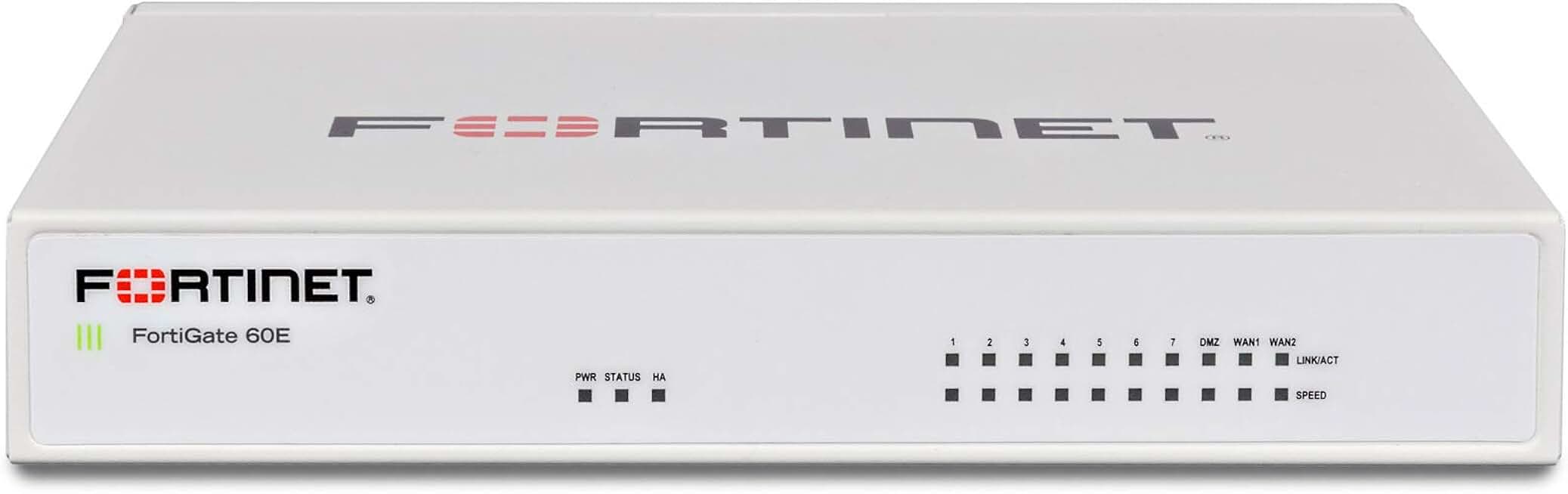
As an Amazon Associate, we may earn from qualifying purchases.
Set up a secure home lab
Building an isolated home lab lets you test cybersecurity tools and attack vectors without risking your primary network. By running virtual machines on an air-gapped segment, you can safely experiment with intrusion detection and penetration testing frameworks. This environment acts as a sandbox, ensuring that any malicious payloads or misconfigurations remain contained.
Testing in this sandboxed environment helps you understand how threats behave before they reach your production network. It also provides a safe space to practice incident response and patch management. For authoritative guidance on securing your infrastructure, refer to resources from CISA.
Common questions about home security
Keeping your home network safe requires consistent effort. Cybersecurity is not a one-time setup; it is an ongoing practice of protecting your systems from digital attacks. Regular updates and strong passwords are the foundation of this defense.
How often should I update my router firmware?
Check for firmware updates monthly. Manufacturers release patches to fix security holes that hackers could exploit. If you use a consumer-grade router, enable automatic updates if available. For manual checks, visit the manufacturer’s website or use their companion app.
What is the best antivirus for a smart home?
Standard antivirus software protects your computers and phones, but smart home devices often need different protection. Focus on a robust firewall and network segmentation. Tools like the Eufy Security Camera or TP-Link Kasa smart plugs often have built-in security features. Ensure these devices are on a separate guest network from your main computers.
How do I secure my Wi-Fi network?
Change your default router password immediately. Use WPA3 encryption if your router supports it. Disable WPS, which is a known security vulnerability. According to CISA, implementing these basic preventative measures significantly reduces the risk of unauthorized access to your network.
No comments yet. Be the first to share your thoughts!